Onboarding member utilities under a G&T or muni
Last updated: October 15, 2026
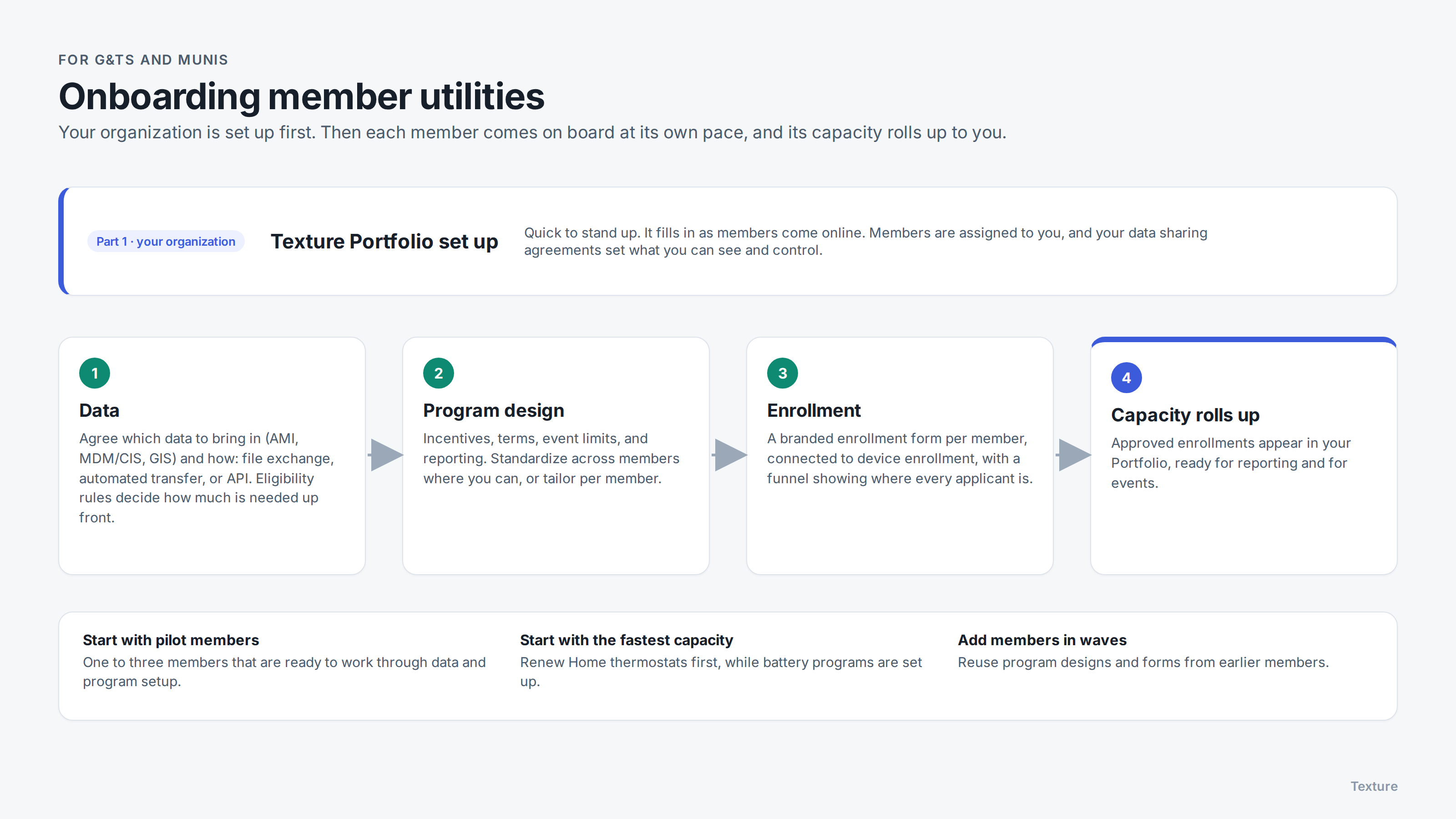
When a G&T or muni works with Texture, onboarding happens in two parts: setting up your organization, then bringing each member utility on board. This article walks through both, so you and your members know what to expect.
Part 1: Your organization
Texture sets up your organization, including your Texture Portfolio view, early in onboarding. It's quick to set up, but it starts out empty: totals, capacity, and enrollments fill in as your members come online.
Your Texture Solutions team assigns each member utility to your organization. What you can see and control for each member follows the data sharing agreements between you and your members. See Texture Platform and Texture Portfolio: access for G&Ts and munis.
Part 2: Each member utility
Every member gets its own Organization, workspaces, and its own programs, so each can move at its own pace. For each member, onboarding covers:
1. Data
We start by agreeing which data the member wants in Texture, such as meter (AMI), billing or customer (MDM/CIS), and GIS data, and how to bring it in. There are three ways:
File exchange: the member exports files and sends them to us. See Sending files with File Exchange.
Automated file transfer: scheduled transfers over SFTP or cloud storage, with a secure connection if needed, so data keeps flowing without manual exports.
API integration: a direct connection to the member's systems, on a regular schedule.
How much data a member needs up front depends on its program rules. If enrollment is checked against account numbers or service addresses, we need the member's customer data first. If eligibility is based on ZIP codes or the member's service territory, programs can start with much less. More data is always useful, but holding some back doesn't block a program from getting started.
Guides: AMI data, MDM/CIS data, GIS data, service territory boundaries.
2. Program design
Next we agree how each program works: incentives, terms and conditions, how often and how long events run, and reporting needs. Your organization can set one standard design for all members, or members can tailor their own.
Some device manufacturers need a separate program setup when designs differ between members, so standardizing where you can shortens setup time.
Two programs can get capacity online especially quickly:
Renew Home Energy Shift Capacity for smart thermostats: customers are already enrolled with Renew Home, so capacity is typically available within about two weeks. See Getting started with Renew Home via NRTC DERMS.
Ready-made battery program designs, such as the cooperative capacity battery program available through NRTC, which includes Tesla. When a member's program fits the design, a battery program can typically be stood up in about 30 days. See the Battery program design template.
3. Enrollment
Texture builds each member's enrollment form with them: which questions to ask, how to check eligibility, whether to approve automatically, and which device brands to offer. Forms carry the member's own branding, since customers know their local utility.
The form connects directly to device enrollment, so a customer signs up and connects their device in one flow. See Program enrollment and device connection flow.
Each member's enrollment funnel shows where every applicant is: applied, eligible, connected, approved. If your organization manages enrollments on members' behalf, you can follow the same steps in each member's workspace from one login.
4. Capacity rolls up to you
As each member's enrollments are approved, that capacity appears in your Portfolio, ready for reporting and for events. See How aggregated program control works for G&Ts and munis.
Sequencing and timing
Most organizations don't wait for every member to finish before getting value:
Start with one to three pilot members that are ready and have the capacity to work through data and program setup.
Start with the fastest capacity, such as Renew Home thermostats, while longer setups like battery programs are in progress.
Add members in waves, reusing the program designs and forms from earlier members.
Program setup for a member typically takes around 90 days, depending on the data and device types involved. Your Texture Solutions team will share a timeline for your members and meet with you regularly throughout.